 ChatGPT
 Claude
 Grok
Grok Perplexity
 Gemini
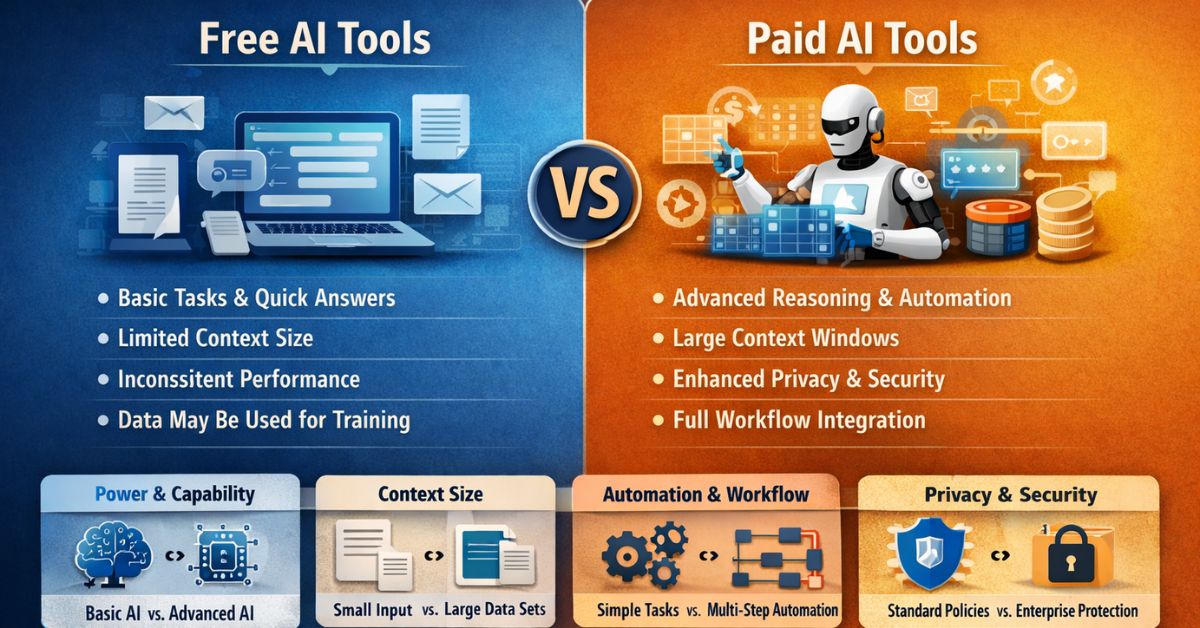
Free AI tools are good enough for one-off content, basic keyword research, and small campaigns. They start falling short once you need to track how you show up in AI search results, run paid social at scale, or manage more than a handful of clients or campaigns at once. If you're still doing all of that manually and it's working, don't pay. If you're spending hours patching together what a paid tool would do automatically, that's your answer.
I get asked some version of this question every week, usually from someone running a small agency or a solo marketing operation who's watched their AI tool stack grow from "one ChatGPT tab" to six different subscriptions they're not sure they need. So let's actually break it down, not in the vague "paid is better" way most of these posts do, but by what each tier can and can't do for marketing work specifically.
Where free AI tools genuinely hold up
I'll say this upfront because most guides on this topic won't: free tools in 2026 are good. Not "good enough to tolerate," actually good.
If you're brainstorming headlines, drafting a first pass at a blog post, summarizing a competitor's landing page, or writing ad copy variations to test, a free-tier assistant handles that without complaint. Free keyword tools will get you a decent starting list. Free design tools will get a social graphic out the door. None of this requires a subscription.
Where I see people waste money is paying for a paid plan they use exactly like the free one : for quick drafts and one-off tasks. If that's your usage pattern, stop paying and save the money. The upgrade only pays for itself once your work outgrows what free tiers were built for.
Where the gap actually starts to hurt
1. AI visibility : this is the one most marketers are sleeping on
Here's something that changed fast and quietly: people don't just Google things anymore, they ask ChatGPT, Gemini, and AI Overviews directly. Whether your brand gets mentioned in those answers is becoming its own ranking problem, separate from traditional SEO. This is exactly the shift I cover in more depth in structuring content so LLM systems can actually parse it : getting your content AI-citation-ready isn't optional anymore, it's the difference between showing up in an AI answer or not existing there at all.
Free tools mostly can't tell you this. There's no free equivalent of a proper AI visibility tracker that shows you how often your brand shows up in AI-generated answers versus your competitors. Paid AI visibility platforms exist specifically to close that gap, they monitor how large language models represent your brand, catch when you're being left out of category answers, and flag where your content needs restructuring to get picked up. If you're running marketing for a client and can't answer "are we showing up in AI search," that's a real gap in what you're offering, and it's becoming a harder one to explain away.
2. Rank tracking at any real scale
A free rank tracker will check a handful of keywords a few times a week, and that's fine if you're running one small site. It stops being fine the moment you're managing multiple client sites or a keyword list that runs into the hundreds. Free tools throttle you, cap your keyword count, or only update sporadically, so you end up manually checking rankings to fill the gaps, which defeats the purpose of tracking at all.
Paid tools track daily, across more keywords, with historical data you can actually build a report from. If your job involves showing clients month-over-month movement, this is one of the clearer cases where the subscription pays for itself in saved hours alone.
Ranking is only half the story, though. I've written before about how strong impressions with a weak click-through rate mean you're leaving traffic on the table, which is worth pairing with any rank tracking tool, free or paid. Position without clicks isn't really a win.
3. Paid social and user acquisition
This is where free tools basically don't compete. Scaling paid social, testing creative variants across platforms, and optimizing acquisition spend all require tools that connect directly into ad accounts, pull performance data automatically, and adjust targeting or budget based on live results. That's not a "type a prompt, get an answer" workflow. It needs a system wired into your ad platforms, running continuously.
Free AI assistants can help you draft ad copy or brainstorm audience angles. They can't manage a live budget or optimize acquisition cost while you sleep. If paid acquisition is a meaningful part of your work, this is one of the clearest "just pay for it" categories on the list.
4. Volume and consistency for agencies
A freelancer publishing twice a week doesn't feel free-tier limits much. An agency publishing daily across multiple brands feels them fast; inconsistent tone between drafts, watermarks on generated visuals, usage caps that hit mid-project. None of these are dealbreakers individually, but they add up into real lost time, and lost time is the actual cost of "free." I see this most clearly with businesses running SEO campaigns across multiple countries or markets : the coordination overhead free tools create scales with every new market you add, not just every new brand.
Free vs Paid: The Practical Breakdown
|
What you need |
Free tier |
Paid tier |
|
Drafting content, ad copy |
Handles it fine |
Marginal improvement |
|
Keyword research (small scale) |
Handles it fine |
Better data depth |
|
Rank tracking |
Limited keywords, slow updates |
Daily tracking, larger volume, history |
|
AI search visibility |
Not really available |
Purpose-built tracking tools |
|
Paid social / acquisition |
Manual, prompt-based only |
Connected, automated optimization |
|
Multi-client / multi-brand work |
Gets messy fast |
Built for scale and consistency |
|
Commercial usage rights |
Sometimes restricted |
Usually clear and included |
A simple way to decide
Ask yourself one question honestly:
Is the limit costing you more time than the subscription would cost you in money?
If you're occasionally hitting a rank-tracking cap or manually checking AI Overview mentions once in a while, stay free : it's not worth it yet. If you're doing that every week, or you're turning down client work because you can't scale tracking and reporting, the math has already flipped in favor of paying, you just haven't run the numbers yet.
Most people I work with end up on a mixed stack anyway: free tools for drafting and quick research, one paid tool for whatever their actual bottleneck is (usually tracking or paid social), and nothing else. That's the right instinct. You don't need every paid tool on the market, you need the one that's solving your specific bottleneck.
FAQs
1. Are paid AI marketing tools actually worth it over free ones?
Depends entirely on where your bottleneck is. For drafting and basic research, no, free is fine. For rank tracking at scale or AI visibility monitoring, yes, because there's often no real free substitute.
2. What's the biggest difference between free and paid AI tools for marketing in 2026?
Scale and automation. Free tools help you do tasks manually, faster. Paid tools increasingly do the tracking and optimization work themselves, in the background, continuously.
3. Is there a free way to track AI search visibility?
Not a proper one, no. You can manually check how your brand shows up in AI Overviews or chatbot answers occasionally, but there's no free tool doing this systematically the way paid AI visibility platforms do.
4. Do free rank tracking tools work for agencies managing multiple clients?
Not well. Keyword caps and slow update cycles make free rank trackers impractical once you're past one or two small sites. This is one of the clearest cases for upgrading.
5. Can free AI tools handle paid social and user acquisition?
Not really, beyond helping you draft copy or brainstorm targeting ideas. Actually managing and optimizing paid acquisition needs a tool connected to your ad accounts, which is a paid-tier feature.
6. How do I know if I've outgrown free AI tools?
If you're spending real time working around a limit, whether that's a keyword cap, a tracking gap, or manual reporting, more than once a week, you've probably outgrown it. Occasional friction isn't a signal. Weekly friction is.
7. Should a freelancer or solo marketer pay for AI tools?
Usually not across the board. Most solo marketers do fine on free tools for drafting and research, and only need one paid tool if they're running paid social or managing rankings for multiple sites.
8. What should I look for before upgrading to a paid AI marketing tool?
Identify your actual bottleneck first, tracking, visibility, or paid acquisition are the three that come up most, then find the one tool that solves it. Don't buy a full suite to fix a single problem.
Final take: don't buy the stack, buy the fix
Free AI tools in 2026 aren't the compromise they used to be. For most day-to-day marketing tasks, they're genuinely enough, and I say that as someone who still uses free tools for a good chunk of my own workflow. The gap only shows up in three specific places: tracking your visibility in AI search, tracking rankings at scale, and running paid acquisition. If none of those are where your work is stuck, don't pay yet. If one of them is, that's the single tool worth buying, not a full suite you'll use 20% of.
I've spent the last several years auditing exactly this kind of tool sprawl for clients across 8 countries, and the pattern repeats every time: teams overspend on features they don't touch and underinvest in the one gap that's actually costing them clients. If you're not sure which category applies to you, that's usually the fastest thing to figure out with a second pair of eyes.
Not sure if your AI visibility and rank tracking setup is actually working, or just running? Book a free strategy call and I'll walk through your current stack with you, no pitch, just a straight answer on what to keep, what to cut, and what's actually worth paying for.